
Pendlr
Connect Pendlr (formerly Kruitbosch) to your SitePack webshop. Bicycles, parts and stock come in from Pendlr automatically, and your webshop orders go to Pendlr as dropshipments.
About this app
Pendlr, formerly Kruitbosch, is one of the largest wholesalers in the cycling industry. With this app you sell their range in your SitePack webshop without entering a single product by hand.
How it works
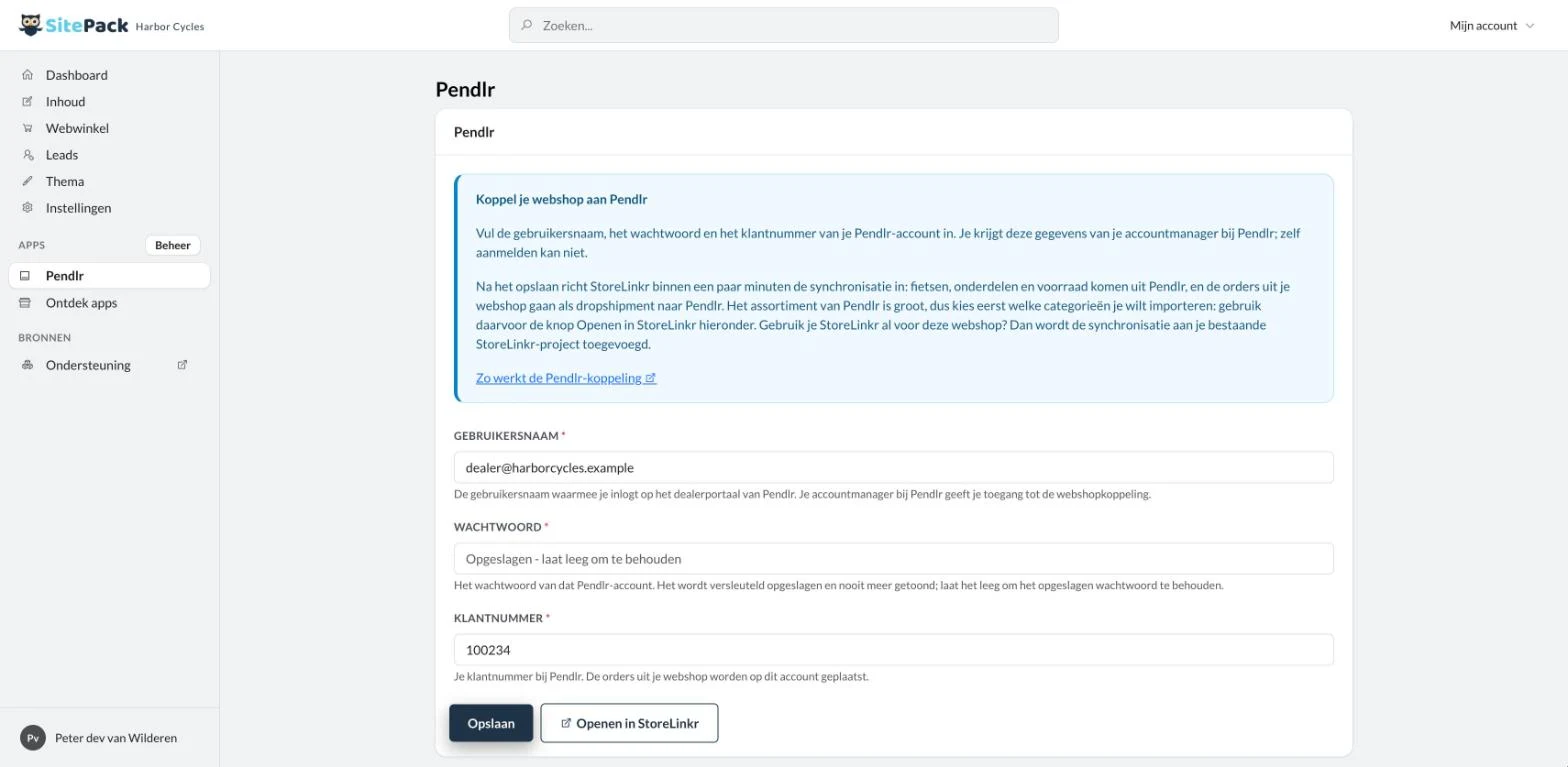
Install the app and fill in the username, password and customer number of your Pendlr account. Within a few minutes StoreLinkr sets up the connection. You choose which Pendlr categories you want to sell; those products come into your webshop with their images, properties, purchase prices and stock, and are kept up to date from then on.
Orders as dropshipments
When a customer orders, the order goes to Pendlr as a dropshipment. Pendlr ships it straight to your customer, and the track & trace comes back automatically.
Already using StoreLinkr?
Then the Pendlr sync is added to the StoreLinkr project that already runs your webshop, next to the integrations you already have. Nothing is set up twice.
Stored securely
Your password is stored encrypted and never shown again. Changed your details later? Save them again and the connection is updated right away.
Always in the picture
The sync runs on StoreLinkr, the integration platform of SitePack. The Open in StoreLinkr button on the settings page signs you straight in to choose your categories, follow the sync and view the logs.
What you need
A Pendlr dealer account with a customer number and access to the webshop connection. Your Pendlr account manager provides the login details.
Key features
- The Pendlr range in your webshop, automatically Products, images, purchase prices and stock from Pendlr appear in your SitePack webshop and stay up to date.
- Webshop orders sent to Pendlr as dropshipments New orders go to Pendlr, who ship directly to your customer. No need to keep stock yourself.
- Track & trace comes back by itself As soon as Pendlr ships, the carrier and track & trace are added to the order.
- You choose which categories you sell The Pendlr range is large. Switch on only the categories that fit your shop.
- Works with your existing StoreLinkr project Already using StoreLinkr for this webshop? The Pendlr sync is added there, next to your other integrations.
How to set it up
You need a Pendlr dealer account with access to the webshop connection. Your Pendlr account manager provides the details.
- Install the app Install Pendlr from the SitePack app store.
- Enter your Pendlr details Fill in your username, password and customer number in the app settings and save.
- Choose your categories Click Open in StoreLinkr and switch on the Pendlr categories you want to sell.
- Start selling The products appear in your webshop, and new orders go to Pendlr automatically.
Frequently asked questions
Where do I get my Pendlr username, password and customer number?
From your account manager at Pendlr. There is no self-service sign-up for the webshop connection.
Why are no products imported yet?
The Pendlr range is large, so nothing is imported until you choose categories. Click Open in StoreLinkr on the app settings page and switch on the categories you want to sell.
I already use StoreLinkr. Do I get a second project?
No. The Pendlr integrations are added to the StoreLinkr project that already syncs your webshop. Integrations you already have there are not added twice.
Why does the recommended price sometimes look lower than my purchase price?
Pendlr quotes the recommended price per piece, while the purchase price can be per packaging unit. That is not an error.
What happens when I remove the app?
The app's integrations are switched off and your products and orders are no longer synced with Pendlr. Integrations you set up yourself stay as they are.

Start your website and add the apps you need
Try SitePack free and install apps whenever your business is ready for them.