Freewheel Free
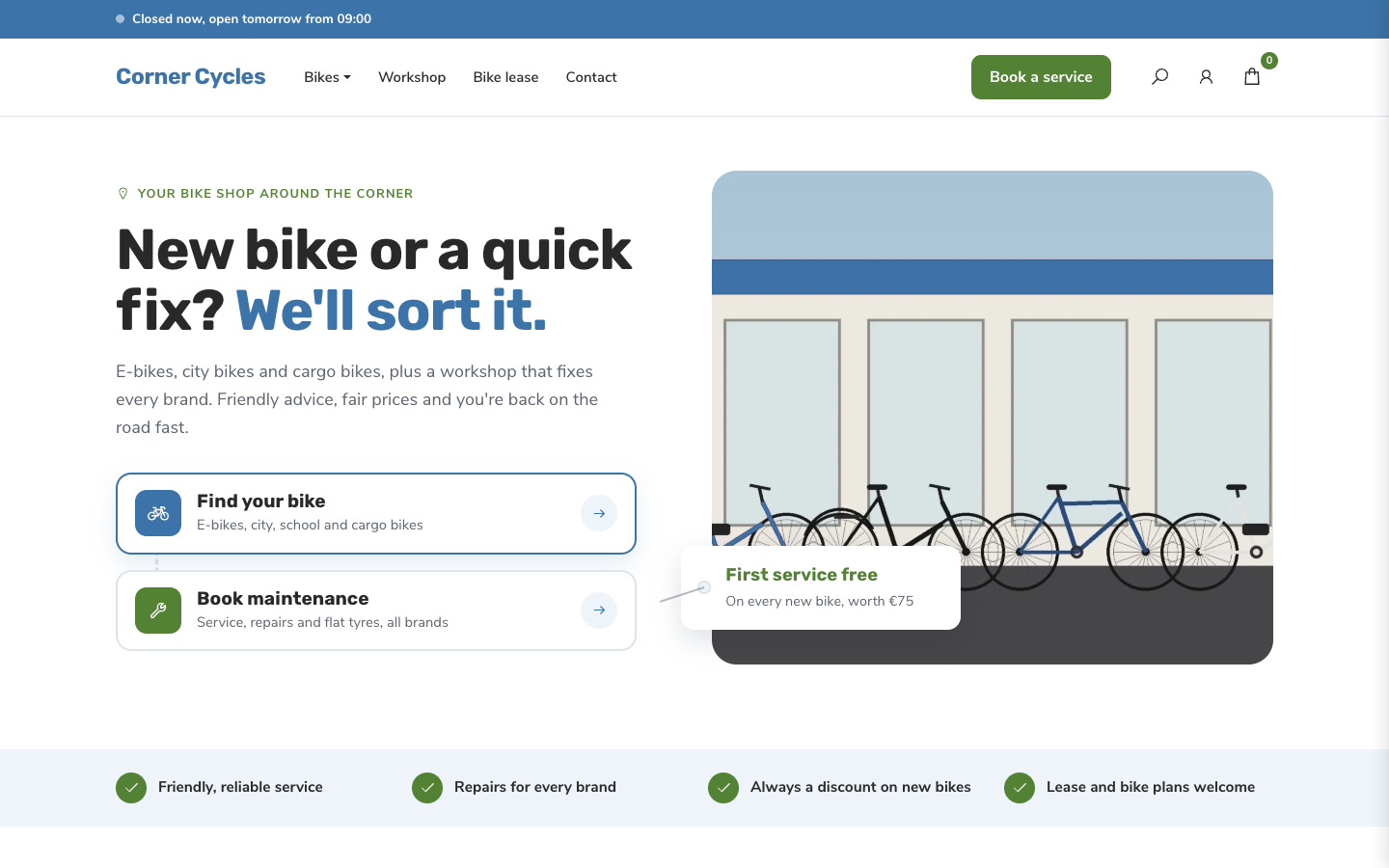
Freewheel is built for the neighbourhood bike shop that sells bikes online but lives off its workshop, lease and service. Visitors can shop a bike or book maintenance from the first screen, and see straight away when your store is open.
About this theme
Freewheel is made for local bike shops and two-wheeler dealers: e-bikes, city bikes, cargo bikes, parts and accessories, with a workshop behind the counter. It puts your service on the same level as your shop, so customers find a new bike and a repair slot just as easily.
The home page opens with two clear paths, one to your bikes and one to maintenance, next to a photo with a promo tag and your review score. Below it come your selling points, categories, a workshop price list, your newest bikes, a lease explainer with partner logos, your store with this week's opening hours, your reviews, the latest blog posts and a newsletter sign-up. You choose the order, and any section can be hidden.
The header shows a live opening status ("Open today until 17:30") taken from your location's opening hours, and a menu item you mark as a button, such as "Book a service", becomes a prominent button in the header and on phones. Product pages show a gallery, variant picker and buy box, followed by a band that invites visitors to see the bike in your store. Category pages have filters, sorting and a help card that calls your shop.
Everything the theme shows comes from your own SitePack data: categories, products, selling points, blog posts, locations, review score and reviews. Texts, service prices, lease steps and logos are fields you fill in. Every colour, the corner radius and the page width are settings, so the theme follows your brand.
Key features
- Shop and service paths The hero gives visitors two clear routes: find a bike or book maintenance.
- Live opening status The header and store section show whether you are open now, straight from your location's opening hours.
- Workshop price list Show up to four services with their price as workshop tags, with buttons to book or see all prices.
- Lease explainer Explain bike lease in three steps and show the logos of the lease companies you work with.
- Reviews from SitePack Your review score, recommendation rate and latest reviews appear automatically when you have them.
- Every colour is yours All colours, corner radius and page width are settings, so the theme matches your brand.
Fully in your own brand
The colours in the examples are only a starting point. In the editor you set your own colours, fonts and logo, and they carry through to every page of the theme.
How to set it up
Freewheel works with the data you already keep in SitePack. These steps make the home page complete.
- Assign the home template Open the home page, choose the Home (Freewheel) template and save.
- Add your store location Fill in your address, phone number and opening hours under Settings > Locations; the store section and opening status use them.
- Fill in the hero and workshop Write your hero text, link the two paths, and add up to four services with their price.
- Set up the lease band Add a title, the three steps and the logos of the lease companies you work with, or leave the title empty to hide the band.
- Add a Book a service button Create a menu item to your booking page and set it as a button in the navigation editor.
Frequently asked questions
Can I change the order of the home page sections?
Yes. The home page template has a section order field: list the sections in the order you want and leave out the ones you want to hide. Sections without content, such as reviews or blog posts, hide themselves.
Where does the opening status in the header come from?
From the opening hours of your first location in Settings > Locations. The status is worked out in the visitor's browser, so it is always current.
How do I get the Book a service button in the header?
Add a menu item that links to your service or booking page and set it as a button in the navigation editor. Freewheel shows it as the accent button in the header, and as a full-width button under the header on phones.
Do I need an online store?
The shop pages (categories, products, cart) need the online store. Without it, the home page still shows your workshop, lease information, store, reviews and blog.
Which fonts does Freewheel use?
You pick the fonts in your design settings. Freewheel is designed for Rubik headings with Nunito Sans body text, and also works well with Arimo and Inter.
Pick a theme and launch your site today
Try SitePack free, choose a design and switch whenever you like.