Trim Free
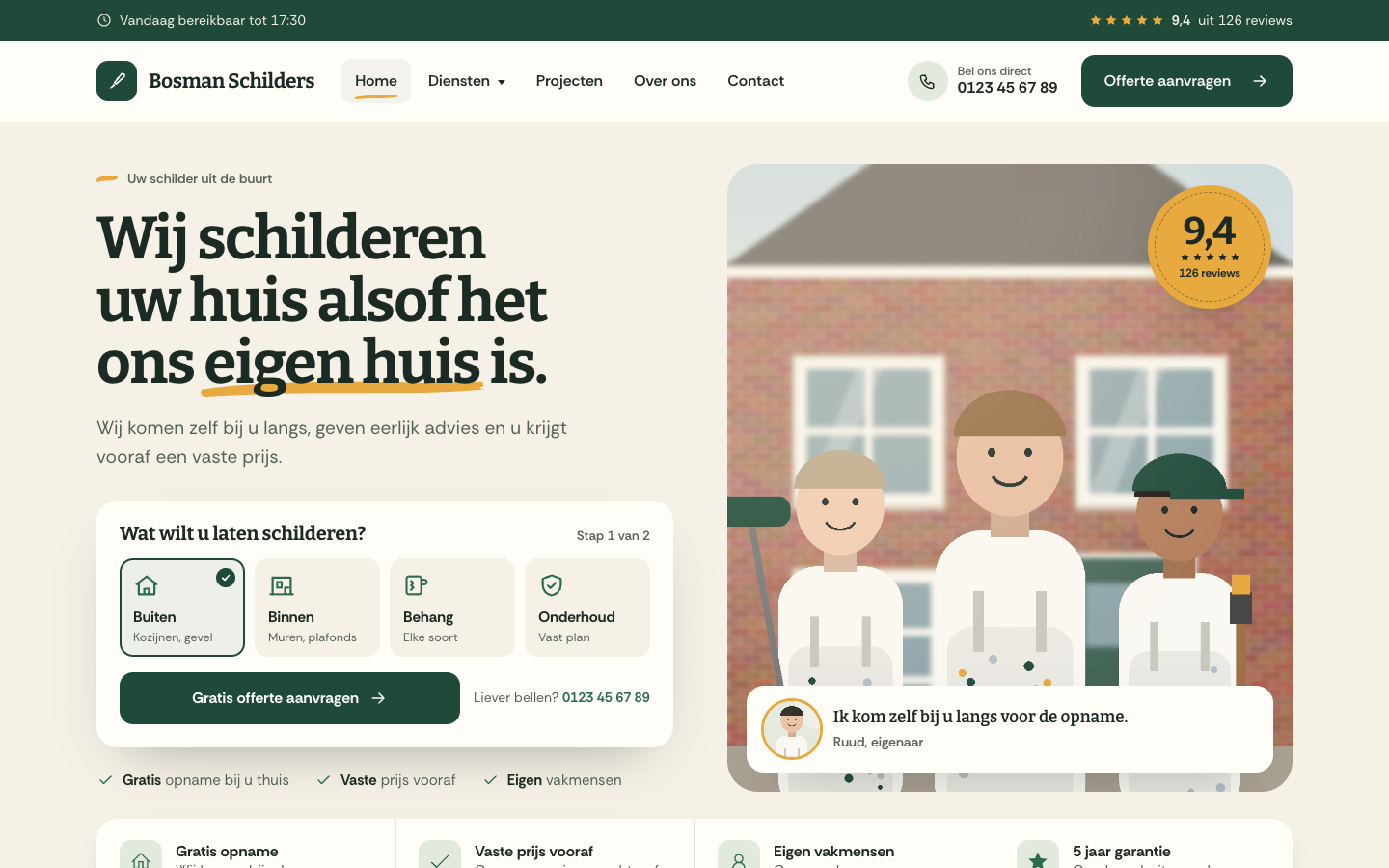
Trim is a friendly, tidy theme for small painting companies that want more quote requests. It puts the owner and the team up front, starts the quote in the hero and explains your way of working in three simple steps.
About this theme
Trim is made for small house painting companies, from a one-person business to a team of fifteen, doing exterior and interior painting, wallpapering, maintenance plans and wood rot repair. It feels like the local craftsman you happily let into your home: warm paper background, deep green and ochre, sturdy slab headlines and one hand-painted brush stroke under a key word.
The home page opens with a team photo, an owner card with a personal line and a round review seal. Next to it sits the quote starter: visitors pick exterior, interior, wallpaper or maintenance, and that choice is already filled in when the quote page opens. Below come your selling points, four service cards with paint-swatch labels, a three-step "how we work" panel, recent projects with a before and after slider, an about section with years in business, figures and team faces, reviews and certifications, your service area with a postcode checker and a closing quote block with a short form.
The quote page holds a three-part form with a progress bar, next to the owner card, what happens next and your direct contact details. Requests reach you by email and are saved as leads. Projects come from the free Portfolio app: an overview with category filters and project pages with the slider, facts, story, client quote and gallery. Trim also has an about page, a service page template and a sticky call and quote bar on phones.
You choose the order of the home sections and hide what you do not need. Every text has a sensible default, sections without content hide themselves, and every colour, the corner radius, the page width and the section spacing are settings.
Key features
- Quote starts in the hero Visitors pick the kind of work right in the hero, and the full quote form opens with that choice already filled in.
- Owner and team up front A team photo, an owner card with a personal line and a round review seal show the people behind the brush.
- Three steps, fixed price A soft "how we work" panel explains request, home visit and fixed quote in three clear steps that work without any input.
- Before and after projects Projects from the Portfolio app get category filters, paint-swatch labels and a before and after slider.
- Service area checker Show a map, your towns and a postcode check, so visitors know at once whether you work in their area.
- Few settings, sane defaults Every text has a translated default and empty sections hide themselves, so the site reads well before you fill anything in.
Fully in your own brand
The colours in the examples are only a starting point. In the editor you set your own colours, fonts and logo, and they carry through to every page of the theme.
How to set it up
Trim works with the data you already keep in SitePack. These steps make the home page complete and send every button to your quote page.
- Add your location Add your address, phone number, email and opening hours. The header, the call buttons and the contact block use them.
- Create the quote page Create a page with the Quote request (Trim) template and add a menu item to it, shown as a button, as the last item of the main menu.
- Assign the home template Choose the Home (Trim) template for the home page, add your team photo, the owner card and the link to your quote page.
- Add your projects Open the Portfolio app and add a few finished jobs with a category, place, cover photo and, where you have them, before and after photos.
- Show your service area Add a map image, your towns and postcodes in the home template, plus your reviews, certifications and selling points.
Frequently asked questions
Do I need to install the Portfolio app myself?
No. The free Portfolio app is installed automatically when you activate Trim. Add your finished jobs there with a cover photo, and optionally before and after photos, a story and a client quote; they appear on the home page, the projects overview and their own pages.
How do quote requests reach me?
The quote form sends you an email with all answers and saves the request as a lead in SitePack. Visitors can also call you directly: the phone number comes from your first location.
When does the before and after slider show?
When a project has both a before photo and an after photo. Projects with only a cover photo show that photo instead, so every project looks finished.
Can I change the order of the home page sections?
Yes. The home template has a section order field: list the sections in the order you want and leave out the ones you want to hide. Sections without content hide themselves.
Can I sell products with Trim?
Trim is a website theme built around quote requests, so it has no shop on the home page. If you switch on the online store anyway, product, category and cart pages follow the same style.
Which fonts does Trim use?
You pick the fonts in your design settings. Trim is designed for Bitter headings with Rethink Sans body text.
Pick a theme and launch your site today
Try SitePack free, choose a design and switch whenever you like.