Gearbox Free
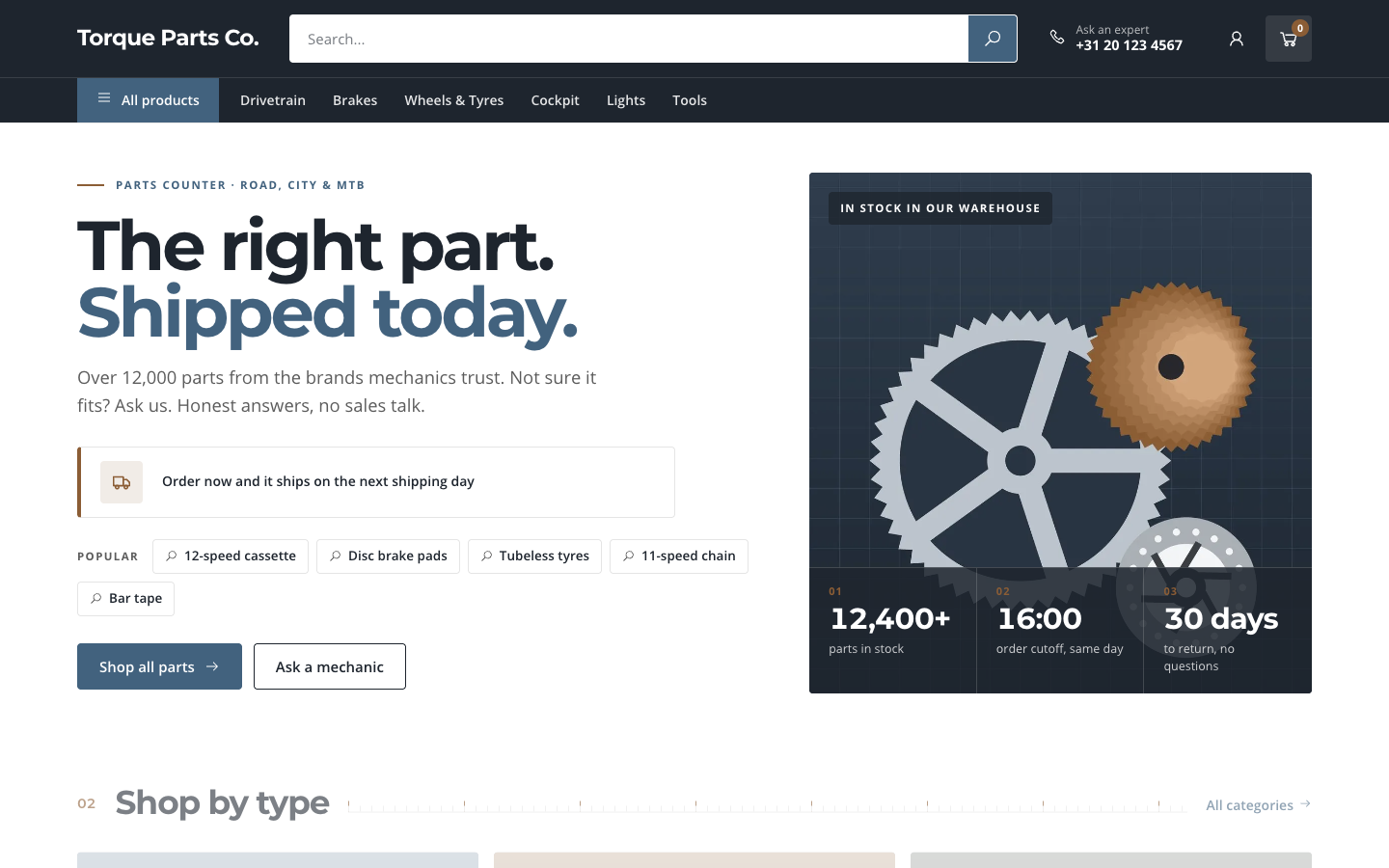
Gearbox is built for shops with a large catalogue of parts: a dark search-first header, spec cards in tight catalogue grids and a dispatch clock that counts down to your order cutoff.
About this theme
Gearbox is made for web shops that sell parts, spares and accessories from a large catalogue: bike parts, but just as well car or moto parts, tools or hardware. Customers come to find one specific part, so search and findability come before lifestyle photography.
The home page opens with a search-first hero: a big title, a live dispatch clock that counts down to your order cutoff time, popular searches as one-click chips and three figures on a photo panel. Below it you choose the sections and their order: shop by type, shop by component, bestsellers with Popular / New in / On sale tabs, deals, why order here with an advice panel, reviews, FAQ, blog, newsletter and a closing call to action. Sections without content hide themselves.
Every product grid uses spec cards: brand, name, category and part number, a large price and a square arrow, set in a catalogue grid with fine hairlines. Category pages get a compact head with sub-category chips and a four-column grid; product pages show the part numbers as chips, the variant picker, a quantity stepper and an advice panel with your phone number.
You control every colour, the corner radius, the page width and the spacing from the design settings, and every text, photo and link on the home page from the template fields. Prices, part numbers and figures use tabular numerals, so long product lists stay easy to scan.
Key features
- Search-first header A wide search field, your advice phone number and a category rail with an All products button.
- Live dispatch clock Counts down to your order cutoff on shipping days and switches to a next-day message after it.
- Spec cards for parts Brand, name, category, part number and a large price in a tight catalogue grid.
- Shop by component Your main categories as a catalogue grid with images, next to three large shop-by-type tiles.
- Configurable home page Eleven sections you can reorder or hide, each filled from your own shop data.
- Fully adaptive design Every colour, radius, width and spacing comes from your design settings.
Fully in your own brand
The colours in the examples are only a starting point. In the editor you set your own colours, fonts and logo, and they carry through to every page of the theme.
How to set it up
Gearbox is ready in a few steps.
- Install the theme Choose Gearbox in the theme marketplace and activate it for your site.
- Set your colours and fonts Pick your brand, accent and header colours in the design settings, plus Space Grotesk and Inter or your own fonts.
- Assign the home template Open your home page and select the Home (Gearbox) template.
- Fill the home page Add your hero texts, cutoff time, popular searches and photos, and set the order of the sections.
- Add categories and products Give your main categories an image and add brands and article numbers to your products for complete spec cards.
Frequently asked questions
Is Gearbox only for bike shops?
No. It suits any web shop with a large catalogue of parts or spares, such as car and moto parts, tools, hardware or electronics spares. The bike-related texts in the demo are example content.
How does the dispatch clock work?
You enter your order cutoff time (for example 16:00) and your shipping days in the home page template. On shipping days the clock counts down to the cutoff in the visitor's local time; after the cutoff it shows that the order ships on the next shipping day. Leave the time empty to hide the clock.
Which fonts does the theme use?
You choose the fonts in your design settings. Gearbox is designed for Space Grotesk headings with Inter body text; Manrope or Work Sans also work well.
Can I change the order of the home page sections?
Yes. The sections field of the home page template sets the order, and leaving a section out hides it. Sections without content, such as deals when nothing is on sale, hide themselves.
Do I need an online store subscription?
The shop pages (categories, products, cart and checkout) need an online store subscription. The home page and content pages also work on a website subscription.
Pick a theme and launch your site today
Try SitePack free, choose a design and switch whenever you like.