Kickstand Free
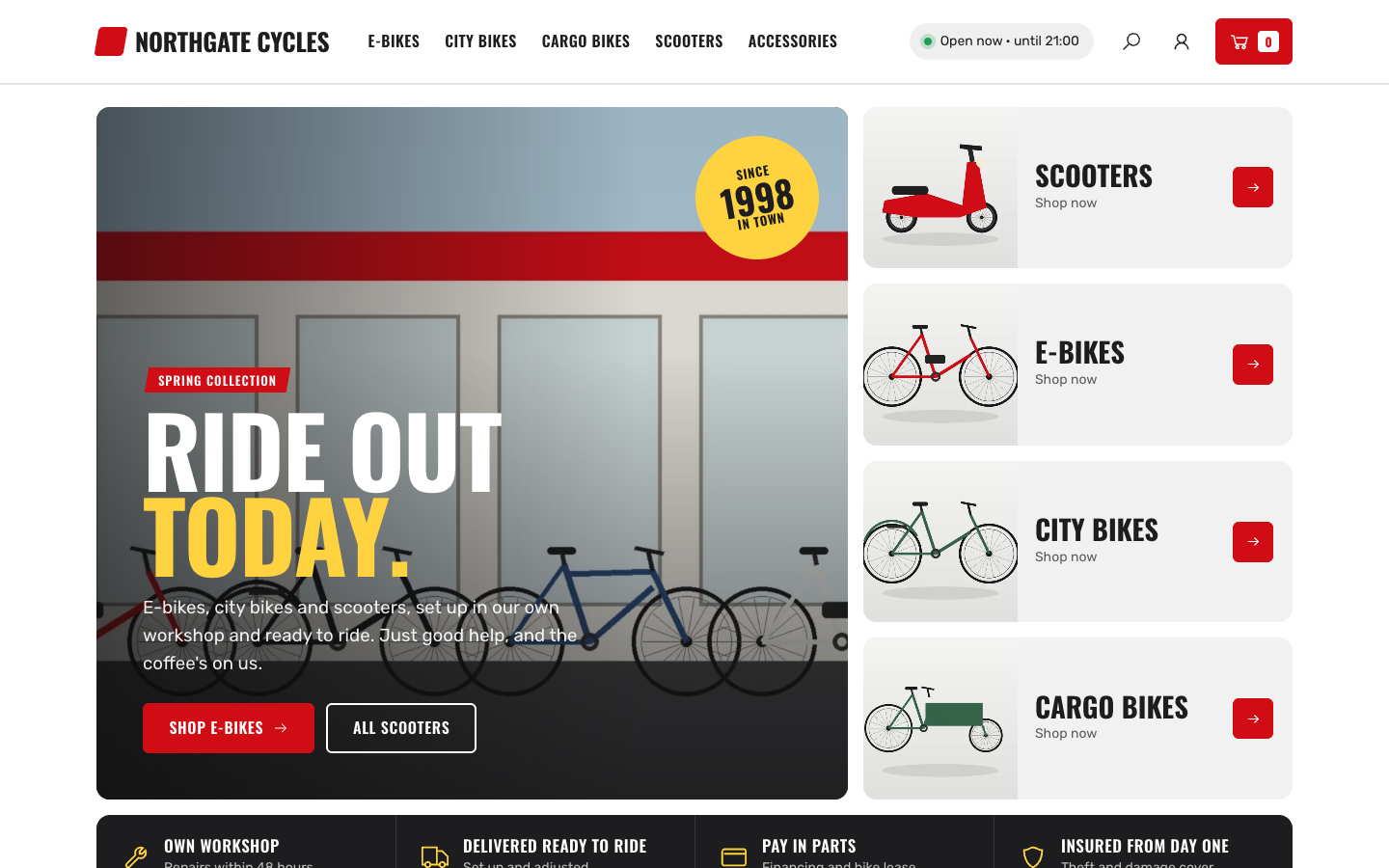
Kickstand gives two-wheeler shops an energetic web shop with big category tiles, price-tag deals, a workshop band and a live open-now status from your opening hours.
About this theme
Kickstand is made for bike, e-bike and scooter shops that sell online and also run a store with a workshop. It looks like a busy showroom: big uppercase headings, slanted labels, chunky photo tiles and yellow price tags on every deal.
The home page starts with a large hero photo next to a rail of your four main categories, followed by your USPs on a dark strip. Then come a deals band with an optional countdown, all categories as tall photo tiles, a workshop band with up to four services, a product grid, your store with today's opening hours, your review score, the latest news, upcoming events and a newsletter sign-up. Products, categories, opening hours, reviews and posts come straight from your shop, and every section hides itself when there is nothing to show.
The header shows an open-now status based on your opening hours, a search overlay and a clear cart button. Product pages have a photo gallery, stock status, option chips, a large add-to-cart button, pick-up in your store with a route link and a call-the-store panel. Category pages come with filters, sorting and sale prices on price tags.
You control every colour, the corner radius, the button shape, the page width and the spacing between sections. Each home section has its own texts, images and options, and you set the order of the sections yourself. Everything also works on phones, with a compact header and a slide-down menu.
Key features
- Category rail in the hero Your four main categories sit right next to the hero photo, so visitors pick a bike type in one click.
- Live open-now status The header and store section show whether you are open right now and until when, based on your opening hours.
- Deals on price tags Sale prices appear on bold yellow price tags with the saving on the photo, on the home page and in every category.
- Workshop and services band Show repairs, service checks, lease and insurance with icons and two buttons on a dark band.
- Store with opening hours Your address, route link, phone number and this week's hours with today highlighted, next to a photo or video.
- Sections you can reorder Turn home sections on or off and change their order; sections without content hide themselves.
Fully in your own brand
The colours in the examples are only a starting point. In the editor you set your own colours, fonts and logo, and they carry through to every page of the theme.
How to set it up
Kickstand looks finished as soon as your shop has categories and products. These steps make it yours.
- Install and assign the home template Activate Kickstand and set the Home (Kickstand) template on your home page.
- Add your location and opening hours Fill in your address, phone number and opening hours in Settings > Locations for the open-now status and the store section.
- Fill the hero and workshop Upload a hero photo, write your title and add up to four workshop services with their icons.
- Set your colours Pick your brand, accent and header colours, and adjust the radius and button shape in the theme settings.
- Add USPs and a menu Add your store promises in Settings > USPs and build your main menu; they appear in the header and on the home page.
Frequently asked questions
Do I need an online store for Kickstand?
Kickstand is built as a web shop theme. The product, category and cart pages need the online store; the home page, content pages and blog also work without products, and empty sections hide themselves.
Where does the open-now status come from?
From the opening hours of your first visible location in Settings > Locations. Without opening hours the status is not shown.
Can I use my own colours and fonts?
Yes. Every colour, the corner radius, the button shape, the page width and the section spacing are settings, and you pick the heading and body fonts in your design settings. The theme is drawn for Oswald with Rubik.
Which home sections are there?
Hero with category rail, USPs, deals, categories, workshop, products, store, reviews, news, events, app posts and newsletter. You choose which ones show and in what order.
Does the review score update by itself?
When a review integration is connected, the reviews section shows your live score. You can also enter your own score and a customer quote.
Does Kickstand work on phones?
Yes. On phones the header gets a menu button, the open status moves to a slim line under the header and the category rail and USPs become compact grids.
Pick a theme and launch your site today
Try SitePack free, choose a design and switch whenever you like.